
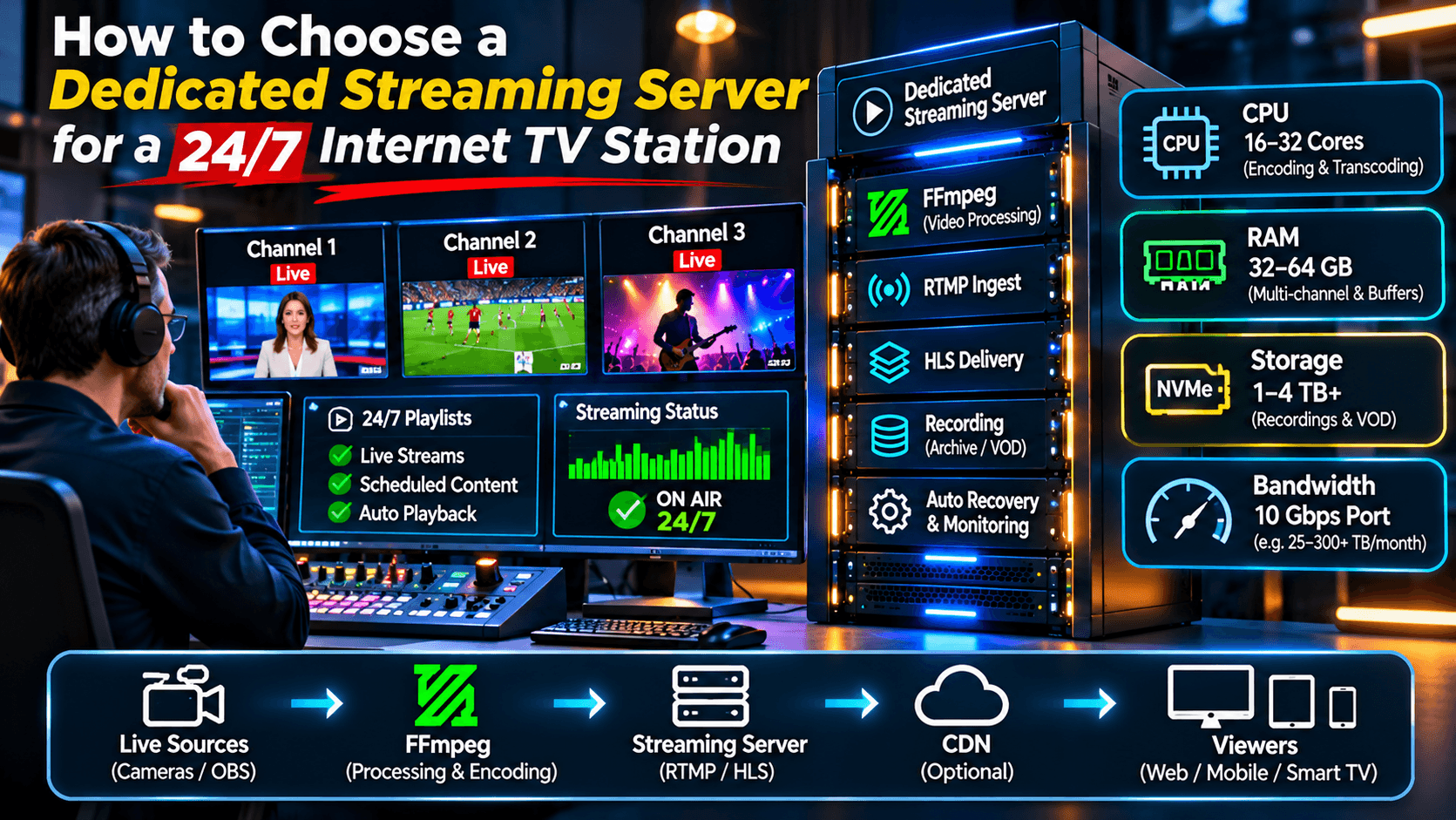
Launching an internet television station has become considerably easier over the past decade. Affordable cameras, professional broadcasting software and modern streaming protocols allow relatively small organisations to operate television channels that reach audiences around the world.
However, running a channel continuously, 24 hours a day and seven days a week, introduces challenges that occasional live broadcasters rarely encounter.
A server that performs perfectly during a two-hour event may not be suitable for continuous broadcasting, particularly when multiple channels, recording, video processing and hundreds of simultaneous viewers are involved.
Choosing the correct infrastructure requires understanding more than processor speed or memory capacity.
For broadcasters who need predictable resources and professional technical management, dedicated streaming servers provide an alternative to shared hosting environments, with greater control over streaming applications, network configuration and hardware resources.
This guide explains the main technical considerations, including server specifications, bandwidth calculations, FFmpeg processing, storage and long-term reliability.
1. Understanding the Requirements of a 24/7 TV Station
An internet television station differs from an occasional live streaming event in several important ways.
First, the channel must remain available continuously. Even when no live presenter is broadcasting, the station may need to play prerecorded programmes, advertisements or scheduled content.
Second, the system must handle changes in audience size throughout the day.
A small station might have only 20 viewers during the morning but several hundred during an evening programme.
Third, the infrastructure needs to recover gracefully from problems.
If an encoder disconnects or a streaming process stops, administrators need a reliable way to restore broadcasting.
A typical 24/7 television environment may include:
- Live camera feeds and prerecorded programming.
- Automated playlists and programme scheduling.
- RTMP ingest from broadcasting software.
- HLS delivery to browsers and mobile devices.
- Video recording and on-demand archives.
- Monitoring and automatic process recovery.
Not every station needs all these features. A simple channel can operate with relatively modest resources, while a multi-channel television platform may require substantially more infrastructure.
2. How Much CPU Power Does Streaming Require?
Processor requirements depend heavily on whether the server simply redistributes existing video or performs additional encoding.
Consider two different situations.
In the first, an encoder sends an H.264 stream at 2 Mbps. The streaming server receives the signal and makes it available to viewers without changing the video encoding.
This process generally requires relatively little CPU power.
In the second, the server receives a high-resolution stream and creates several different versions for viewers using slower internet connections.
The server may generate 1080p, 720p and 480p outputs simultaneously.
This process is called transcoding, and it can require considerable processing power.
| Streaming operation | Relative CPU demand |
|---|---|
| RTMP ingest and relay | Low |
| HLS packaging without re-encoding | Low to moderate |
| Recording an existing stream | Usually low |
| Single 1080p software transcode | Moderate to high |
| Multiple simultaneous transcoding jobs | High |
| Several 4K software transcoding jobs | Very high |
These categories are illustrative rather than fixed performance benchmarks.
The actual requirements depend on the codec, frame rate, encoding preset, source quality and processor architecture.
For this reason, broadcasters should estimate their workload before selecting a server.
A powerful processor is useful, but purchasing more CPU capacity than necessary may simply increase monthly costs.
3. How Much RAM Is Necessary?
Memory is another important consideration, although streaming applications do not necessarily require enormous amounts of RAM.
A straightforward RTMP-to-HLS server may operate comfortably with a moderate memory allocation.
More complex environments require additional resources for multiple applications, buffering, management software and operating-system services.
As a general planning guide:
| Broadcasting environment | Illustrative RAM allocation |
|---|---|
| Small streaming installation | 8–16 GB |
| Several channels and management services | 16–32 GB |
| Larger multi-channel environment | 32–64 GB |
| Complex broadcasting infrastructure | 64–128 GB or more |
These are starting points for planning, not minimum requirements or guaranteed capacities.
Memory consumption must be measured under actual workloads.
Linux also uses available memory for filesystem caching. Consequently, a server showing substantial cached memory is not necessarily experiencing memory pressure.
Administrators should pay particular attention to available memory, swapping behaviour and application-specific usage.
4. The Difference Between a 10 Gbps Port and Monthly Traffic
One of the most misunderstood aspects of streaming hosting is the difference between network speed and bandwidth consumption.
A server advertised with a 10 Gbps network port does not necessarily include unlimited monthly traffic.
The port speed describes the maximum theoretical rate of the network interface.
Monthly traffic, usually measured in terabytes, describes the amount of data transferred during a billing period.
For example, a server might have a 10 Gbps port but include only 20 TB of monthly outbound traffic.
This distinction becomes extremely important when distributing video to hundreds of viewers.
A practical bandwidth calculation
Imagine a television station broadcasting continuously at 2 Mbps per viewer.
Assume every viewer watches 24 hours a day for a 30-day month.
The approximate outbound traffic would be:
| Concurrent viewers | Monthly traffic |
|---|---|
| 10 | 6.48 TB |
| 25 | 16.2 TB |
| 50 | 32.4 TB |
| 100 | 64.8 TB |
| 250 | 162 TB |
| 500 | 324 TB |
These figures use decimal terabytes and assume continuous viewing at a constant 2 Mbps, without additional protocol overhead.
Actual consumption will differ because viewers join and leave, video bitrates fluctuate and some delivery architectures use caching.
Nevertheless, the table illustrates why bandwidth planning is essential.
A television station with 100 continuous viewers at 2 Mbps could generate approximately 65 TB of outbound traffic in one month.
That is far more than the allowances included with many entry-level dedicated servers.
5. Why a CDN Can Reduce Origin Server Traffic
A content delivery network, or CDN, can help distribute video efficiently to audiences in different geographical regions.
Instead of every viewer connecting directly to the origin streaming server, a CDN can cache suitable streaming segments and deliver them through geographically distributed edge locations.
This can reduce repeated requests to the origin and improve distribution capacity.
For example, imagine a station broadcasting a single HLS stream to 500 viewers.
Without caching or another distribution layer, the origin may need to transmit substantial traffic directly to those viewers.
With effective CDN caching, many viewers can receive the same media segments from edge servers.
However, a CDN does not eliminate bandwidth costs.
Traffic is transferred through the CDN, and its pricing model must be considered separately.
Cache efficiency also depends on stream configuration, segment URLs, cache headers and viewing patterns.
For growing television stations, the correct combination of dedicated origin infrastructure and CDN delivery can be more economical than relying exclusively on direct server connections.
6. Using FFmpeg for Continuous Broadcasting
FFmpeg is particularly useful in automated television environments.
It can process prerecorded files, convert media formats, adjust video parameters and send encoded streams to broadcasting infrastructure.
For example, a television operator may need to prepare hundreds of video files with different resolutions and audio formats.
FFmpeg can standardise those files before they enter the broadcast playlist.
It can also support recording, media inspection and specialised processing workflows.
The official FFmpeg documentation describes its command-line tools, supported media formats and processing capabilities.
For a 24/7 TV station, automation is especially valuable.
However, FFmpeg alone does not provide a complete television scheduling and management platform.
A broadcaster may combine FFmpeg with scheduling software, process supervision and a dedicated RTMP/HLS streaming server.
The choice depends on how much administration and custom development the organisation is prepared to manage.
7. Storage Requirements for Television Broadcasting
Storage requirements depend on whether the server handles only live streams or also stores prerecorded programmes and recordings.
A station broadcasting exclusively from an external encoder may require relatively little storage.
A station maintaining a large video library has very different requirements.
For example, one hour of video encoded at a constant 4 Mbps occupies approximately 1.8 GB.
That means:
| Video duration | Approximate storage at 4 Mbps |
|---|---|
| 1 hour | 1.8 GB |
| 24 hours | 43.2 GB |
| 7 days | 302 GB |
| 30 days | 1.3 TB |
| 90 days | 3.9 TB |
These figures exclude filesystem overhead, additional audio tracks and multiple encoded versions.
A broadcaster maintaining several months of recorded programmes may therefore require multiple terabytes of storage.
NVMe SSDs offer high performance and can be particularly useful for applications involving frequent file operations.
However, not every video archive needs expensive high-speed storage.
Some organisations use a combination of local SSD storage and separate object storage for older recordings.
The important consideration is matching storage performance, capacity and cost to the actual broadcasting workflow.
8. Why Reliability Matters More Than Impressive Specifications
A server with excellent hardware specifications can still experience streaming interruptions.
Common causes include unstable source connections, excessive transcoding workloads, application failures, network problems and incorrect configuration.
For continuous broadcasting, monitoring is therefore essential.
Administrators should track CPU usage, available memory, storage capacity, network utilisation and streaming application status.
Where appropriate, automatic service recovery can help restart failed processes.
However, automatic restarts should not replace investigation of recurring problems.
A process that crashes repeatedly may indicate a configuration error, insufficient resources or a software defect.
Operating-system updates and streaming software maintenance are equally important.
A reliable television station needs an operational plan, not simply a powerful machine.
9. A Practical Example: Planning a Small Internet TV Station
Consider a hypothetical broadcaster launching three internet television channels.
Each channel broadcasts continuously at approximately 2 Mbps.
The station expects an average of 40 simultaneous viewers across all channels, with occasional peaks of 150 viewers.
The operator also wants to store prerecorded programmes and maintain a modest recording archive.
The requirements might look like this:
| Component | Planning requirement |
|---|---|
| Television channels | 3 |
| Streaming bitrate | 2 Mbps per viewer |
| Average concurrent viewers | 40 |
| Peak concurrent viewers | 150 |
| Average direct outbound traffic | Approximately 25.9 TB/month |
| Peak direct delivery rate | Approximately 300 Mbps |
| Media library | 500 GB–1 TB initially |
| Delivery format | HLS |
| Source ingest | RTMP |
| Recording | Optional |
| CDN | Recommended for wider distribution |
The estimated monthly traffic assumes 40 viewers continuously watching at 2 Mbps for 30 days.
This broadcaster would need to consider a monthly traffic allowance above 20 TB if most viewing traffic were delivered directly from the server.
However, a properly configured CDN could substantially change the amount of traffic leaving the origin.
Similarly, if the station used prerecorded media that was already correctly encoded, its CPU requirements could be much lower than those of a station performing continuous transcoding.
This demonstrates why server selection should begin with a workload calculation rather than a hardware advertisement.
10. Shared Hosting or Dedicated Streaming Infrastructure?
Shared streaming hosting can be an economical option for small broadcasters.
It reduces the need to manage an entire server and can provide access to an existing streaming control panel.
However, shared environments typically impose limits on resource consumption, storage, channels or traffic.
A dedicated streaming server provides greater control over the environment.
The broadcaster can configure applications, allocate resources and design a streaming workflow suited to its requirements.
Dedicated infrastructure becomes particularly attractive when a project needs multiple channels, extensive recording, customised applications or predictable processing capacity.
It is not automatically the best option for every broadcaster.
A small station with limited traffic may be better served by a managed shared plan.
The objective should be to choose infrastructure that matches the current workload while leaving a sensible path for expansion.
11. Planning for Growth
Many streaming projects begin with modest audiences.
A channel may initially attract only a few dozen viewers before gradually developing a larger following.
As the audience grows, network traffic often becomes a more significant concern than the number of television channels.
A broadcaster operating one popular channel may consume more bandwidth than another operating ten channels with small audiences.
For this reason, capacity planning should consider both the number of streams and expected viewer behaviour.
Useful questions include:
- How many viewers are expected simultaneously?
- What video bitrate will each viewer receive?
- How many hours per day will viewers watch?
- Will a CDN handle most playback traffic?
- Does the server need to transcode video?
- How much recorded content must be stored?
- What happens if the primary encoder disconnects?
Answering these questions provides a much stronger foundation for selecting infrastructure.
It also helps avoid two common mistakes: purchasing an unnecessarily expensive server or choosing an inexpensive server that cannot handle the intended workload.
Conclusion: Choose Infrastructure Based on Real Broadcasting Requirements
A successful 24/7 internet television station requires more than a powerful processor and a fast network connection.
CPU resources, memory, storage, streaming software and monthly traffic must work together.
FFmpeg can provide valuable media processing and automation capabilities, while RTMP and HLS technologies support the transmission and delivery of live video.
Dedicated infrastructure offers greater flexibility and predictable hardware resources, but it still requires appropriate configuration and ongoing maintenance.
Perhaps the most important lesson is that the number of viewers, their average bitrate and their viewing duration often matter more than the advertised network port speed.
By calculating realistic traffic requirements and understanding the actual streaming workload, broadcasters can build reliable television platforms without spending unnecessarily on hardware or bandwidth.
For a station intended to operate continuously, careful planning today can prevent expensive technical problems tomorrow.